VS Code Integration
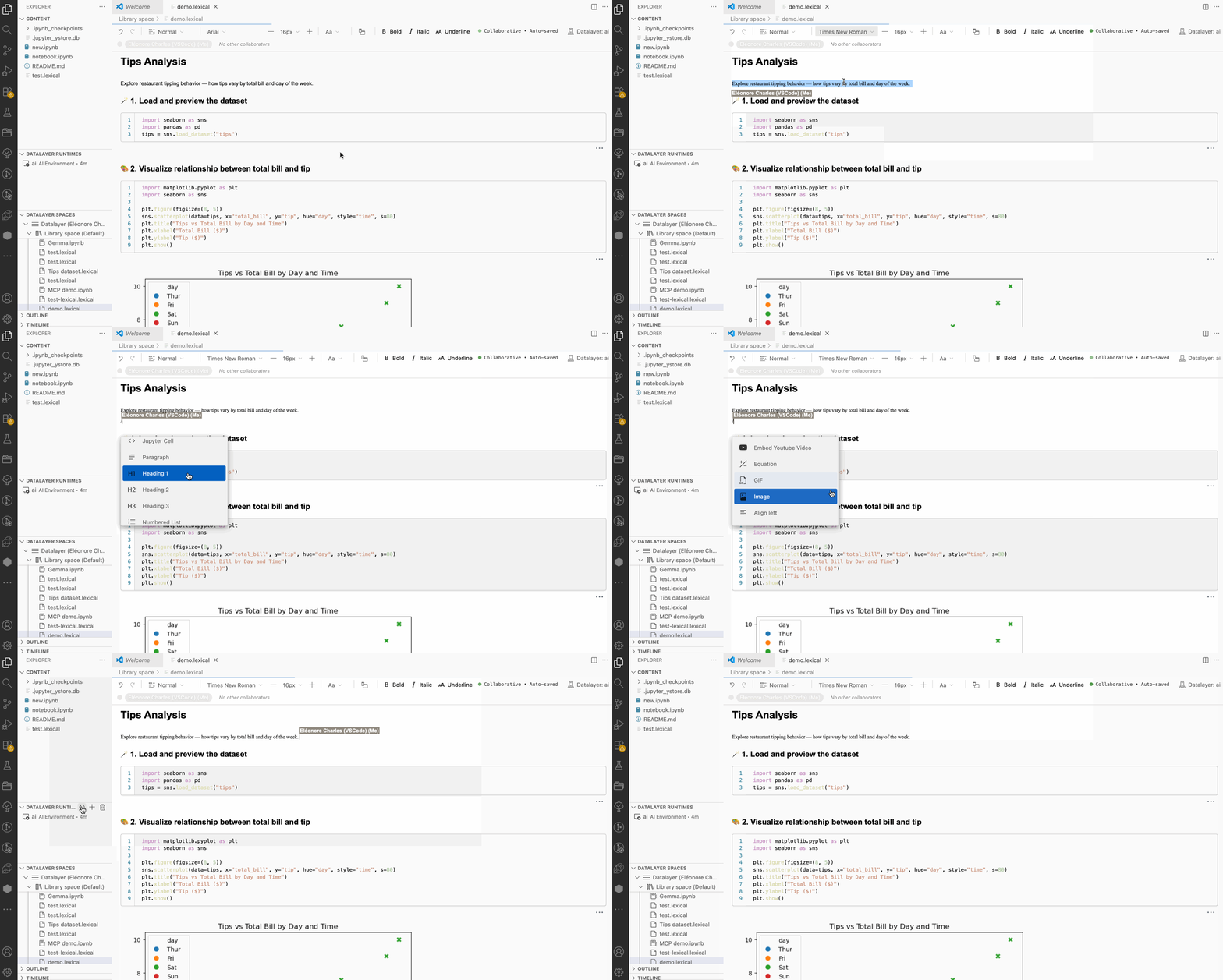
The Datalayer for Visual Studio Code extension lets you execute notebooks on cloud compute, create beautiful reports with Notion-like collaborative documents, and switch effortlessly between local and remote environments - all within your familiar VS Code interface.
The VS Code extension is developed in a separate repository: github.com/datalayer/vscode-datalayer
Quick Start
- Create a free account at datalayer.app
- Install from VS Code Marketplace
- Login:
Ctrl+Shift+P→ "Datalayer: Login to Datalayer" → select your OAuth provider (GitHub) - Scale instantly: Open any
.ipynbfile with the Datalayer Editor → click kernel picker → select cloud runtime - Create rich docs: Create
.dlexfiles for Notion-like collaborative reports with code, images and rich formatting
Key Benefits
⚡ Instant Cloud Scaling
- Zero-setup cloud execution - Run workloads on cloud CPUs or GPUs without any local Python installation
- 2-click scaling - Switch from local development to cloud compute instantly via the kernel picker
- Smart resource management - Automatic runtime creation and reuse to optimize compute costs
📝 Collaborative Rich Documents
- Notion-like documents with rich formatting - Create beautiful reports with headings, lists, images, tables, executable code blocks, etc.
- Real-time collaboration - Multiple users can edit documents simultaneously with live updates
- Mixed content support - Seamlessly combine executable code, images, text, and more in a single document
🔀 Ultimate Flexibility
- Seamless local ↔ cloud switching - Start locally, scale to cloud, then return to local development
- Multiple runtime support - Connect to Datalayer cloud, local Python, or existing Jupyter servers
- Code preservation - Your code runs identically across local and cloud environments
- Hybrid workflows - Use the best of both worlds without vendor lock-in
Core Features
📊 Advanced Document Editors
Jupyter Notebooks
- Full-featured notebook editing with syntax highlighting and IntelliSense
- Execute on cloud GPUs/CPUs, local Python kernels, or remote Jupyter servers
- Seamless kernel switching between cloud, local, and remote runtimes
- Native ZMQ integration for local Python execution (no Jupyter server required)
Datalayer Documents
- Notion-like rich text editor with real-time collaborative editing
- Support for images, tables, code blocks, mathematical equations, and formatted text
- Perfect for creating data science reports, documentation, and presentations
🗂️ Integrated Workspace Management
Datalayer Spaces (Explorer Sidebar)
- Browse and manage your cloud documents and notebooks
- Create, rename, delete files directly in the cloud
- Virtual file paths:
datalayer://Space Name/document.ipynb - Collaborative workspace sharing
Datalayer Runtimes (Explorer Sidebar)
- Real-time monitoring of all active cloud environments
- One-click runtime creation and termination
- Resource usage and cost tracking
- Environment type indicators (CPU/GPU, memory, duration, etc.)
- Health status monitoring and automatic recovery
⚙️ Smart Runtime Management
- Auto-connect - Documents automatically connect to available runtimes (configurable)
- Automatic provisioning - Runtimes created on-demand when you run cells
- Intelligent reuse - Existing healthy runtimes are reused to conserve credits
- Health verification - Automatic checks ensure runtime reliability
- Flexible duration - Configure runtime lifetime (1-1440 minutes)
🎨 Native VS Code Integration
- Theme synchronization - Documents automatically match your VS Code theme
- Unified kernel picker - Access Datalayer cloud runtimes, local Python environments (via Python extension), and existing Jupyter servers
- Native local execution - Direct ZMQ kernel communication without Jupyter server
- Rich status indicators - Connection status and runtime info in status bar
- Command palette integration - All features accessible via
Ctrl+Shift+P - GitHub Copilot integration - Use natural language to create notebooks and insert cells
Installation
From Marketplace
- Open Extensions view (
Ctrl+Shift+X/Cmd+Shift+X) - Search "Datalayer Platform"
- Click Install
From .vsix file
- Download from releases
- Open Command Palette (
Ctrl+Shift+P/Cmd+Shift+P) → "Extensions: Install from VSIX..."
Key Commands
Authentication:
- Login/Logout
- Show Authentication Status
Documents:
- Create New Jupyter Notebook (local or cloud)
- Create New Datalayer Document (local or cloud)
- Context menu in Spaces tree: New Notebook/Datalayer Document in cloud workspace
- Context menu: Open, Rename, Delete, Share for collaboration
Runtimes:
- Select/Switch Runtime (local ↔ cloud switching)
- Terminate Runtime(s)
- View Runtime Controllers Status
- Monitor resource usage and costs
Configuration
Open settings (Ctrl+, / Cmd+,) and search "Datalayer":
Service URLs - Default to https://prod1.datalayer.run:
datalayer.services.iamUrldatalayer.services.runtimesUrldatalayer.services.spacerUrldatalayer.services.spacerWsUrl(WebSocket:wss://prod1.datalayer.run)
Runtime:
datalayer.runtime.defaultMinutes- Duration (default: 10, max: 1440)datalayer.autoConnect.strategies- Auto-connect strategies when opening documents
Logging:
datalayer.logging.level- trace/debug/info/warn/error (default: info)datalayer.logging.includeTimestamps- Add timestamps (default: true)datalayer.logging.enableSDKLogging- Log API calls (default: true)
FAQ
Do I need Python locally?
No! Cloud runtimes handle all execution with zero local setup. You can still connect to local Python/Jupyter environments if preferred for hybrid workflows.
Can I edit cloud documents?
Yes! Cloud documents are fully editable. Create, modify, and collaborate on notebooks and Datalayer documents directly in your cloud spaces.
How do credits work?
Runtimes consume credits while active. The extension intelligently reuses existing healthy runtimes to minimize costs and maximize your credit efficiency.
Can I use without a Datalayer account?
Absolutely! Use it for local .ipynb files and connecting to your existing Python/Jupyter environments. Cloud features require an account.
How fast is the local ↔ cloud switching?
Switching between local and cloud execution takes just 2 clicks via the kernel picker - no configuration or setup required.
What makes Datalayer Documents special?
Think Notion meets Jupyter! Unlike traditional notebooks, Datalayer Documents provide a Notion-like editing experience with rich formatting, real-time collaboration, and support for images, tables, and formatted text alongside executable code.
Resources
- API Documentation - Complete TypeScript API reference
- GitHub Repository - Source code and issues
- VS Code Marketplace - Install the extension
- Datalayer Docs - Platform documentation